Article
Introduction
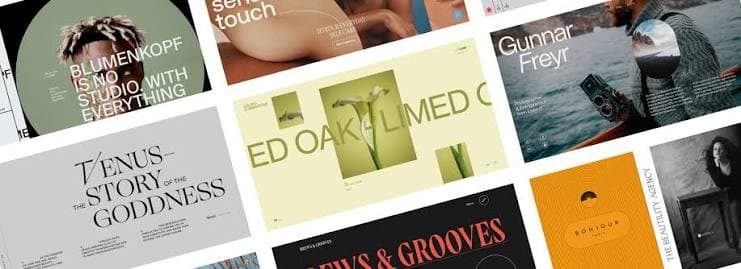
A creative website should not only look good. It should communicate a clear point of view.
Your website should answer three questions quickly:
- Who are you?
- What do you make?
- Why should someone remember you?
Awwwards is a useful lens for this. Its jury scores every site on four criteria: Design (40%), Usability (30%), Creativity (20%), and Content (10%). Design and usability alone make up 70% of the score. Originality matters, but it only counts when the fundamentals hold.
This guide walks through seven topics, in the order I would apply them:
- Typography
- Colors
- Grids & Layouts
- Animations
- Inspiration
- Practice
- The Journey
Typography
Typography sets the foundation of any creative website. It shapes first impressions and carries your message before anything else does. If your type doesn’t match your story and identity, the whole design falls apart.
Font families
- Serif: Evokes sophistication, elegance, and tradition.
- Sans-serif: Clean, readable, and minimal.
- Mono: Every character occupies exact horizontal space. Ideal for code and technical interfaces.
Hierarchy and scale
Most strong sites use no more than two or three typefaces. The variety comes from scale, weight, and spacing, not from adding more fonts.
- Make the largest text feel confident. A display heading that fills the viewport is a design decision, not an accident.
- Keep body text comfortable. Aim for 16px or more and a line height around 1.5 to 1.7.
- Tighten letter spacing on large headings, and loosen it on small uppercase labels.
- Limit line length to roughly 60 to 80 characters for long reading.
Fluid type removes most of the breakpoint work. Define the scale once and let it adapt:
:root {
  --display: clamp(2rem, 11vw, 14rem);
  --h400: clamp(1.5rem, 1.2rem + 1.2vw, 2rem);
  --base: clamp(1rem, 0.95rem + 0.25vw, 1.125rem);
}
const typographyRules = {
  hierarchy: ["h1", "h2", "h3", "base"],
  contrast: "a11y verified",
};
Colors & Grids
Award-winning websites don’t use color to decorate. They use it to evoke emotion, direct attention, and tell a story.
- Dominant color: Sets the overall mood.
- Supporting colors: Add contrast, depth, and rhythm.
- Accent color: Used sparingly for CTAs and highlights.
Color in practice
Start with neutrals. A near-black and an off-white give you a calm base, and a single accent then has real impact. If everything is colorful, nothing stands out.
Contrast is also a usability issue, not only a taste issue. Body text should meet at least a 4.5:1 contrast ratio against its background. Check it early, because fixing it after the design is approved is painful.
Define colors as tokens so a dark theme becomes an override, not a rewrite:
:root {
  --bg: #f4f4f2;
  --fg: #111111;
  --accent: #ffe365;
}

[data-theme="dark"] {
  --bg: #111111;
  --fg: #f4f4f2;
}
Grids & Layouts
A grid is what makes a layout feel intentional. Even the most experimental pages usually sit on a simple structure, and the experiment is in how they bend it.
- Use a 12-column grid on desktop. It divides cleanly into halves, thirds, and quarters.
- Let content span columns unevenly. A sidebar of 4 columns next to an article of 8 gives a clear reading hierarchy.
- Use consistent spacing steps instead of arbitrary pixel values. Repeated rhythm is what reads as polish.
- Treat white space as a layout element. Empty space gives the important parts room to breathe.
Breaking the grid works because the grid exists. Let one image bleed to the edge, or push a heading across several columns, and keep the rest of the page disciplined.
Animations
Motion should explain something. It can guide attention, show how elements relate, or give feedback after an action. If an animation does none of these, it is decoration, and decoration has a cost.
Some principles I follow:
- Animate
transformandopacity. They are cheap for the browser and keep the frame rate smooth. - Use easing with character. A fast start and slow finish feels natural, while linear motion feels mechanical.
- Keep durations short for interface feedback and longer for scene changes.
- Respect
prefers-reduced-motionand provide a calm alternative.
Scroll-driven motion is a good example of motion with a purpose. A title that shrinks as you scroll, then hands over to a compact version in the sidebar, tells the reader where they are:
gsap.to(titleRef.current, {
  y: 80,
  scale: 0.7,
  opacity: 0,
  ease: "none",
  scrollTrigger: {
    trigger: containerRef.current,
    start: 0,
    end: "top top+=32",
    scrub: true,
  },
});
A heavy hero animation that drops below 60fps costs more in usability than it earns in creativity. Test on a mid-range phone, not only on your own machine.
Inspiration
Inspiration is a habit, not a mood. Collect references on purpose.
- Browse award sites and note what exactly you like: the type, the pacing, the transitions, the copy.
- Look outside the web. Editorial design, posters, film titles, and architecture all carry ideas that web design rarely borrows.
- Save references with a short note about why they work. A folder of screenshots without notes is hard to use later.
- Study the details. Hover states, loading sequences, and page transitions are where craft shows.
The goal is to understand the decision behind a design, then make your own decision for your own content. Copying a look produces something that feels familiar. Understanding the reason produces something you can adapt.
Practice
Skill comes from building, so make small projects with a single focus.
- Rebuild a layout you admire using only HTML and CSS.
- Create a type specimen page with a fluid scale.
- Build one scroll interaction, and make it work on mobile too.
- Ship a small site with real content, not placeholder text.
Real content matters more than it seems. Lorem ipsum hides problems with length, tone, and hierarchy. Write the actual words as early as you can, because they decide what the layout needs.
Also pay attention to the parts judges and users both notice: responsive behavior, semantic markup, accessibility, and load performance. Awwwards scores these on the developer side, and they are what separate a nice demo from a solid site.
The Journey
There is no finish line with this work. Each project teaches you what to do differently on the next one, and your taste changes along the way.
A simple loop keeps it moving:
- Decide the point of view.
- Build the foundation with type, color, and grid.
- Add motion only where it earns its place.
- Test, simplify, and ship.
- Look back and write down what you learned.
The websites that stay in memory are rarely the most complicated ones. They are the ones where every decision points in the same direction.
If you want to read quality posts & guides early, follow me on my LinkedIn.